Propagation Policy
The PropagationPolicy and ClusterPropagationPolicy APIs are provided to propagate resources to member clusters. For the differences between the two APIs, please see here.
This guide describes the configuration options of PropagationPolicy by explaining each field in the API specification. ClusterPropagationPolicy shares the same spec structure, so the examples apply to both.
ResourceSelectors
The resourceSelectors field specifies which resources should be propagated. At least one selector must be defined.
A ResourceSelector matches resources by API version and Kind, and can optionally narrow by name, labels, and namespace. If neither name nor labelSelector is set, it matches all resources of the given APIVersion/Kind in the effective namespace (defaults to the policy's namespace).
Matching all resources in the policy namespace
If name and labelSelector are omitted, the selector matches all resources of the specified APIVersion/Kind in the effective namespace (policy namespace by default):
apiVersion: policy.karmada.io/v1alpha1
kind: PropagationPolicy
metadata:
  name: all-deployments
spec:
  resourceSelectors:
    - apiVersion: apps/v1
      kind: Deployment
  placement:
    clusterAffinity:
      clusterNames:
        - member1
        - member2
This matches all Deployments in the policy namespace.
For ClusterPropagationPolicy, the same selector matches Deployments in all namespaces.
Matching by name
Match a specific resource by name:
apiVersion: policy.karmada.io/v1alpha1
kind: PropagationPolicy
metadata:
  name: nginx-propagation
spec:
  resourceSelectors:
    - apiVersion: apps/v1
      kind: Deployment
      name: nginx
  placement:
    clusterAffinity:
      clusterNames:
        - member1
This matches only the Deployment named nginx in the policy namespace.
Matching by label
Match resources by label selector:
apiVersion: policy.karmada.io/v1alpha1
kind: PropagationPolicy
metadata:
  name: app-propagation
spec:
  resourceSelectors:
    - apiVersion: apps/v1
      kind: Deployment
      labelSelector:
        matchLabels:
          app: nginx
  placement:
    clusterAffinity:
      clusterNames:
        - member1
This matches Deployments with label app=nginx in the policy namespace.
PropagateDeps
The propagateDeps field controls whether dependent resources should be automatically propagated.
When enabled, resources referenced by the propagated workload (e.g., ConfigMaps and Secrets referenced by a Deployment) will be propagated automatically without needing to list them in resourceSelectors.
apiVersion: policy.karmada.io/v1alpha1
kind: PropagationPolicy
metadata:
  name: nginx-propagation
  namespace: default
spec:
  resourceSelectors:
    - apiVersion: apps/v1
      kind: Deployment
      namespace: default
      name: nginx
  propagateDeps: true
  placement:
    clusterAffinity:
      clusterNames:
        - member1
This propagates the nginx Deployment and its referenced dependencies to member1.
Placement
The placement field specifies how resources should be distributed across clusters. It includes cluster affinity, spread constraints, and replica scheduling strategies.
Cluster Affinity
.spec.placement.clusterAffinity field represents scheduling restrictions that limit which clusters can be selected. If not specified, any cluster can be a scheduling candidate.
ClusterAffinity supports four filtering mechanisms:
- LabelSelector: Filter clusters by labels
- FieldSelector: Filter clusters by fields (provider, region, zone)
- ClusterNames: Explicitly list cluster names
- ExcludeClusters: Explicitly exclude cluster names
When multiple filtering mechanisms are specified, they are combined with logical AND, meaning a cluster must match all specified conditions to be selected.
clusterAffinity defines a candidate set of clusters—it specifies which clusters are eligible for selection, but does not guarantee they will all be selected. The scheduler selects from this candidate set based on various factors such as scheduling strategies, cluster health, and resource availability. To strictly control how many clusters are selected, use spreadConstraints in combination with clusterAffinity.
For example, if you specify 10 clusters in clusterNames but want to ensure only 2 are actually selected, combine it with spreadConstraints using spreadByField: cluster with maxGroups: 2, minGroups: 2.
LabelSelector
LabelSelector is a filter to select member clusters by labels. It uses *metav1.LabelSelector type. If it is non-nil and non-empty, it filters the candidate set to include only clusters matching this filter.
PropagationPolicy can be configured as follows:
apiVersion: policy.karmada.io/v1alpha1
kind: PropagationPolicy
metadata:
  name: test-propagation
  namespace: default
spec:
  resourceSelectors:
    - apiVersion: apps/v1
      kind: Deployment
  placement:
    clusterAffinity:
      labelSelector:
        matchLabels:
          location: us
This creates a candidate set of clusters labeled location=us.
PropagationPolicy can also be configured as follows:
apiVersion: policy.karmada.io/v1alpha1
kind: PropagationPolicy
metadata:
  name: test-propagation
  namespace: default
spec:
  resourceSelectors:
    - apiVersion: apps/v1
      kind: Deployment
  placement:
    clusterAffinity:
      labelSelector:
        matchExpressions:
        - key: location
          operator: In
          values:
          - us
This filters the candidate set to clusters whose location label is in us using a set-based selector.
For a description of matchLabels and matchExpressions, you can refer to Resources that support set-based requirements.
FieldSelector
FieldSelector is a filter to select member clusters by fields. If it is non-nil and non-empty, it filters the candidate set to include only clusters matching this filter.
PropagationPolicy can be configured as follows:
apiVersion: policy.karmada.io/v1alpha1
kind: PropagationPolicy
metadata:
  name: nginx-propagation
  namespace: default
spec:
  resourceSelectors:
    - apiVersion: apps/v1
      kind: Deployment
  placement:
    clusterAffinity:
      fieldSelector:
        matchExpressions:
        - key: provider
          operator: In
          values:
          - aws
        - key: region
          operator: NotIn
          values:
          - us-west-1
This defines a candidate set of clusters from provider aws while excluding those in region us-west-1.
If multiple matchExpressions are specified in the fieldSelector, the cluster must match all matchExpressions.
The key in matchExpressions now supports three values: provider, region, and zone, which correspond to the .spec.provider, .spec.region, and .spec.zone fields of the Cluster object, respectively.
The operator in matchExpressions now supports In and NotIn.
ClusterNames
Users can set the ClusterNames field to specify the selected clusters.
PropagationPolicy can be configured as follows:
apiVersion: policy.karmada.io/v1alpha1
kind: PropagationPolicy
metadata:
  name: nginx-propagation
  namespace: default
spec:
  resourceSelectors:
    - apiVersion: apps/v1
      kind: Deployment
  placement:
    clusterAffinity:
      clusterNames:
        - member1
        - member2
This restricts the candidate set to member1 and member2.
ExcludeClusters
Explicitly exclude clusters from being selected:
apiVersion: policy.karmada.io/v1alpha1
kind: PropagationPolicy
metadata:
  name: nginx-propagation
  namespace: default
spec:
  resourceSelectors:
    - apiVersion: apps/v1
      kind: Deployment
  placement:
    clusterAffinity:
      exclude:
        - member1
        - member3
This excludes member1 and member3 from the candidate set.
ClusterAffinities (Multiple Cluster Groups)
The clusterAffinities field allows defining multiple cluster groups with fallback behavior. clusterAffinity defines one set of selection criteria applied together to produce a single candidate set of clusters. clusterAffinities defines multiple ordered sets of criteria (groups) that are evaluated sequentially: the scheduler tries the first group and falls back to the next only if the previous cannot satisfy scheduling.
clusterAffinities cannot co-exist with clusterAffinity.
How it works
The scheduler evaluates affinity groups in order:
- Try to schedule using the first group
- If the first group doesn't satisfy scheduling restrictions, try the next group
- A cluster can belong to multiple groups
- If no group satisfies the restrictions, scheduling fails
ClusterAffinityTerm
Each group in clusterAffinities is defined by a ClusterAffinityTerm, which includes:
affinityName: a human-readable name for the cluster group- Inline
ClusterAffinityfields such aslabelSelector,fieldSelector,clusterNames, andexclude: these define the primary cluster group for the term overflowAffinities(optional): additional ordered cluster groups that can be used only after the primary group in the same term can no longer accommodate scheduling
With overflowAffinities, you can implement overflow scenarios, such as preferring scheduling to IDC clusters and overflowing to cloud clusters when IDC resources are insufficient.
Because overflow scheduling needs to be aware of member clusters' available resources, Duplicated scheduling and static weight division are currently not supported with overflow scheduling.
How overflowAffinities works
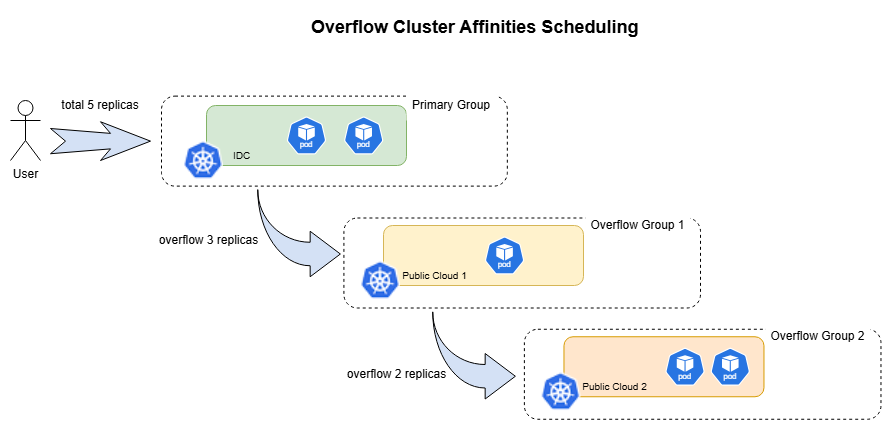
The scheduler evaluates primary group and overflow groups in order:
- Try to assign replicas to the primary cluster group as much as possible.
- If the primary group cannot accommodate all replicas, attempts to assign the remaining replicas to the overflow groups.
- For each overflow group, the number of replicas assigned is the lesser of the remaining unassigned replicas and the group's total available capacity.
- Within each group, replicas are distributed across clusters according to the
placement.replicaSchedulingstrategy. - Scheduling succeeds once all replicas are assigned. If any replicas remain unassigned after evaluating all groups, scheduling fails with this
ClusterAffinityTerm. The scheduler then moves on to evaluate the nextClusterAffinityTerminclusterAffinities, if any.
Use case 1: Local clusters as primary, cloud clusters as backup
The private clusters in the local data center could be the main group, and the managed clusters provided by cluster providers could be the secondary group. The scheduler would prefer scheduling to the main group and only consider the second group if the main group lacks resources.
apiVersion: policy.karmada.io/v1alpha1
kind: PropagationPolicy
metadata:
  name: test-propagation
  namespace: default
spec:
  resourceSelectors:
    - apiVersion: apps/v1
      kind: Deployment
  placement:
    clusterAffinities:
      - affinityName: local-clusters
        clusterNames:
          - local-member1
          - local-member2
      - affinityName: cloud-clusters
        clusterNames:
          - public-cloud-member1
          - public-cloud-member2
This prefers local clusters first and falls back to the cloud group if they cannot satisfy scheduling.
Use case 2: Disaster recovery (primary and backup clusters)
Clusters are organized into primary and backup groups. Workloads are scheduled to primary clusters first, and migrate to backup clusters if primary clusters fail.
apiVersion: policy.karmada.io/v1alpha1
kind: PropagationPolicy
metadata:
  name: test-propagation
  namespace: default
spec:
  resourceSelectors:
    - apiVersion: apps/v1
      kind: Deployment
  placement:
    clusterAffinities:
      - affinityName: primary-clusters
        clusterNames:
          - member1
          - member2
      - affinityName: backup-clusters
        clusterNames:
          - member3
          - member4
This tries primary clusters first and then moves workloads to the backup group if primaries fail.
Use case 3: Overflow from IDC GPU clusters to cloud GPU clusters
The IDC GPU cluster could be the primary group for running GPU-based inference workloads, and the cloud GPU clusters could be the overflow group for handling extra peak traffic. The scheduler would fill replicas into the IDC cluster first and only overflow the remaining replicas to cloud clusters when the IDC cluster cannot accommodate all replicas.
apiVersion: policy.karmada.io/v1alpha1
kind: PropagationPolicy
metadata:
  name: gpu-inference-overflow
spec:
  resourceSelectors:
    - apiVersion: apps/v1
      kind: Deployment
  placement:
    clusterAffinities:
      - affinityName: idc-gpu
        clusterNames:
          - idc-gpu-cluster1
        overflowAffinities:
          - affinityName: cloud-gpu
            clusterNames:
              - cloud-gpu-cluster1
              - cloud-gpu-cluster2
    replicaScheduling:
      replicaSchedulingType: Divided
      replicaDivisionPreference: Weighted
      weightPreference:
        dynamicWeight: AvailableReplicas
This prefers the IDC GPU cluster first and overflows to cloud GPU clusters only when the IDC cluster cannot accommodate all replicas. When traffic decreases, replicas are reclaimed from the cloud GPU clusters first, keeping GPU usage cost-efficient.
ClusterTolerations
The .spec.placement.clusterTolerations field represents cluster tolerations. Like Kubernetes, tolerations work in conjunction with taints on clusters.
After setting one or more taints on a cluster, workloads cannot be scheduled to that cluster unless the policy explicitly tolerates those taints. Karmada currently supports taints with NoSchedule and NoExecute effects.
Setting cluster taints
Use karmadactl taint to taint a cluster:
# Update cluster 'foo' with a taint with key 'dedicated' and value 'special-user' and effect 'NoSchedule'
# If a taint with that key and effect already exists, its value is replaced as specified
karmadactl taint clusters foo dedicated=special-user:NoSchedule
Tolerating cluster taints
To schedule to a tainted cluster, declare the toleration in the policy:
apiVersion: policy.karmada.io/v1alpha1
kind: PropagationPolicy
metadata:
  name: nginx-propagation
  namespace: default
spec:
  resourceSelectors:
    - apiVersion: apps/v1
      kind: Deployment
  placement:
    clusterTolerations:
      - key: dedicated
        value: special-user
        effect: NoSchedule
This allows scheduling onto clusters tainted dedicated=special-user:NoSchedule.
The NoExecute effect is also used in Multi-cluster Failover.
SpreadConstraints
The .spec.placement.spreadConstraints field controls how resources are spread across clusters based on topology domains (cluster, region, zone, or provider).
How spread constraints work
Spread constraints divide clusters into groups based on a specified field and enforce constraints on how many groups are selected:
- SpreadByField: Group clusters by a built-in field
cluster(supported)region(supported)zone(not yet implemented)provider(not yet implemented)
- SpreadByLabel: Group clusters by a custom label
- MaxGroups: Maximum number of groups to select
- MinGroups: Minimum number of groups to select (defaults to 1)
apiVersion: policy.karmada.io/v1alpha1
kind: PropagationPolicy
metadata:
  name: nginx-propagation
spec:
  resourceSelectors:
    - apiVersion: apps/v1
      kind: Deployment
  placement:
    replicaScheduling:
     replicaSchedulingType: Duplicated
    spreadConstraints:
      - spreadByField: region
        maxGroups: 2
        minGroups: 2
      - spreadByField: cluster
        maxGroups: 2
        minGroups: 2
This spreads workloads across exactly two regions with one cluster per region (two clusters total).
If the replica division preference is StaticWeightList, spread constraints are not applied.
If using SpreadByField, you must also specify cluster-level spread constraints. For example, when using SpreadByFieldRegion to specify region groups, you must also use SpreadByFieldCluster to specify how many clusters to select.
ReplicaScheduling
The .spec.placement.replicaScheduling field defines how replicas should be distributed when propagating resources with replica specifications (e.g., Deployments, StatefulSets, or custom CRDs).
There are two replica scheduling types:
- Duplicated: Each cluster receives the full replica count from the resource spec
- Divided: The total replicas are divided among selected clusters based on
ReplicaDivisionPreference
Duplicated mode
All selected clusters receive the same number of replicas:
apiVersion: policy.karmada.io/v1alpha1
kind: PropagationPolicy
metadata:
  name: nginx-propagation
spec:
  resourceSelectors:
    - apiVersion: apps/v1
      kind: Deployment
      name: nginx
  placement:
    clusterAffinity:
      clusterNames:
        - member1
        - member2
    replicaScheduling:
      replicaSchedulingType: Duplicated
This creates a candidate set of member1 and member2, and sends the full replica count to selected clusters. To ensure exactly how many clusters are selected, use spreadConstraints (see SpreadConstraints section).
Divided mode
Total replicas are divided among selected clusters. The division strategy is determined by ReplicaDivisionPreference:
Aggregated division
Divides replicas into as few clusters as possible while respecting their available resources. Note: Aggregated division does not respond to spreadConstraints as it aims to minimize cluster usage.
apiVersion: policy.karmada.io/v1alpha1
kind: PropagationPolicy
metadata:
  name: nginx-propagation
spec:
  resourceSelectors:
    - apiVersion: apps/v1
      kind: Deployment
      name: nginx
  placement:
    clusterAffinity:
      clusterNames:
        - member1
        - member2
    replicaScheduling:
      replicaSchedulingType: Divided
      replicaDivisionPreference: Aggregated
This divides replicas into as few clusters as possible from the candidate set (member1 and member2).
Weighted division
Divides replicas by weight. Supports two weight approaches:
StaticWeightList: Explicitly assign weights to clusters
apiVersion: policy.karmada.io/v1alpha1
kind: PropagationPolicy
metadata:
  name: nginx-propagation
spec:
  resourceSelectors:
    - apiVersion: apps/v1
      kind: Deployment
      name: nginx
  placement:
    replicaScheduling:
      replicaDivisionPreference: Weighted
      replicaSchedulingType: Divided
      weightPreference:
        staticWeightList:
          - targetCluster:
              clusterNames:
                - member1
            weight: 1
          - targetCluster:
              clusterNames:
                - member2
            weight: 2
This allocates replicas proportional to the static weights. With 3 replicas: member1 gets 1 replica (weight 1), member2 gets 2 replicas (weight 2).
If you need to control exactly how many clusters are selected for weighted distribution, combine spreadConstraints with the weight preference:
apiVersion: policy.karmada.io/v1alpha1
kind: PropagationPolicy
metadata:
  name: nginx-propagation
spec:
  resourceSelectors:
    - apiVersion: apps/v1
      kind: Deployment
      name: nginx
  placement:
    clusterAffinity:
      clusterNames:
        - member1
        - member2
    spreadConstraints:
      - spreadByField: cluster
        maxGroups: 2
        minGroups: 2
    replicaScheduling:
      replicaDivisionPreference: Weighted
      replicaSchedulingType: Divided
      weightPreference:
        staticWeightList:
          - targetCluster:
              clusterNames:
                - member1
            weight: 1
          - targetCluster:
              clusterNames:
                - member2
            weight: 2
This ensures exactly 2 clusters are selected via spreadConstraints, and replicas are distributed by the specified weights (1:2 ratio) among them.
DynamicWeight: Generate weights based on available resources
apiVersion: policy.karmada.io/v1alpha1
kind: PropagationPolicy
metadata:
  name: nginx-propagation
spec:
  resourceSelectors:
    - apiVersion: apps/v1
      kind: Deployment
      name: nginx
  placement:
    replicaScheduling:
      replicaDivisionPreference: Weighted
      replicaSchedulingType: Divided
      weightPreference:
        dynamicWeight: AvailableReplicas
This computes weights from available capacity so replicas are divided proportionally by what each cluster can host.
With AvailableReplicas, weights are calculated based on how many replicas each cluster can accommodate:
- If cluster A can fit 6 replicas, B can fit 12, C can fit 18
- Weights become A:B:C = 6:12:18 (1:2:3)
- For 12 total replicas, assignment is A:2, B:4, C:6
If ReplicaDivisionPreference is set to Weighted without WeightPreference, all clusters are weighted equally.
WorkloadAffinity
The .spec.placement.workloadAffinity field enables inter-workload affinity and anti-affinity scheduling policies. This allows you to control whether workloads should be co-located on the same clusters (affinity) or separated across different clusters (anti-affinity).
This is particularly useful for:
High availability: Ensuring duplicate workloads run on different clusters to avoid single points of failureCo-location: Scheduling related workloads to the same cluster to minimize latencyResource isolation: Separating workloads that should not share cluster resources
How workload affinity works
Workload affinity uses labels on resource templates to define affinity groups. Workloads with the same label value under the specified key belong to the same group:
Affinity groupsare identified by a label key-value pair (e.g.,app.group=frontend)Affinity groupsare namespace-scoped: workloads with the same label in different namespaces are not treated as part of the same group- The scheduler maintains an in-memory index of affinity groups for efficient lookup during scheduling
Affinity (co-location)
Affinity rules ensure workloads are scheduled to clusters where other workloads in the same affinity group already exist.
apiVersion: policy.karmada.io/v1alpha1
kind: PropagationPolicy
metadata:
  name: training-job-affinity
  namespace: default
spec:
  resourceSelectors:
    - apiVersion: batch/v1
      kind: Job
      labelSelector:
        matchLabels:
          workload.type: training
  placement:
    clusterAffinity:
      clusterNames:
        - member1
        - member2
        - member3
    workloadAffinity:
      affinity:
        groupByLabelKey: app.group
---
apiVersion: batch/v1
kind: Job
metadata:
  name: training-job-1
  namespace: default
  labels:
    app.group: ml-training
    workload.type: training
spec:
  template:
    spec:
      containers:
      - name: trainer
        image: training:latest
---
apiVersion: batch/v1
kind: Job
metadata:
  name: training-job-2
  namespace: default
  labels:
    app.group: ml-training
    workload.type: training
spec:
  template:
    spec:
      containers:
      - name: trainer
        image: training:latest
Both training jobs have the label app.group=ml-training, so they belong to the same affinity group. The scheduler will schedule training-job-2 to the same cluster where training-job-1 is running.
For the first workload in an affinity group (when no other workloads with matching labels exist), the scheduler will not block scheduling. This allows new workload groups to be created without encountering scheduling deadlocks.
Anti-affinity (separation)
Anti-affinity rules ensure workloads are scheduled to clusters where no other workloads in the same anti-affinity group exist.
apiVersion: policy.karmada.io/v1alpha1
kind: PropagationPolicy
metadata:
  name: flink-anti-affinity
  namespace: default
spec:
  resourceSelectors:
    - apiVersion: flink.apache.org/v1beta1
      kind: FlinkDeployment
      labelSelector:
        matchLabels:
          ha.enabled: "true"
  placement:
    clusterAffinity:
      clusterNames:
        - member1
        - member2
        - member3
    workloadAffinity:
      antiAffinity:
        groupByLabelKey: pipeline.id
---
apiVersion: flink.apache.org/v1beta1
kind: FlinkDeployment
metadata:
  name: flink-pipeline-primary
  namespace: default
  labels:
    pipeline.id: payment-processing
    ha.enabled: "true"
spec:
  image: flink:1.17
  flinkVersion: v1_17
  jobManager:
    replicas: 1
---
apiVersion: flink.apache.org/v1beta1
kind: FlinkDeployment
metadata:
  name: flink-pipeline-backup
  namespace: default
  labels:
    pipeline.id: payment-processing
    ha.enabled: "true"
spec:
  image: flink:1.17
  flinkVersion: v1_17
  jobManager:
    replicas: 1
Both FlinkDeployments have the label pipeline.id=payment-processing, so they belong to the same anti-affinity group. The scheduler will ensure they run on different clusters to provide high availability.
Combining affinity and anti-affinity
You can specify both affinity and anti-affinity terms in the same policy. Both rules must be satisfied during scheduling:
apiVersion: policy.karmada.io/v1alpha1
kind: PropagationPolicy
metadata:
  name: combined-affinity
  namespace: default
spec:
  resourceSelectors:
    - apiVersion: apps/v1
      kind: Deployment
  placement:
    clusterAffinity:
      clusterNames:
        - member1
        - member2
        - member3
    workloadAffinity:
      affinity:
        groupByLabelKey: app.stack
      antiAffinity:
        groupByLabelKey: app.instance
This ensures:
- Workloads with the same
app.stacklabel value are co-located on the same cluster - Workloads with the same
app.instancelabel value are separated across different clusters
Workload affinity is evaluated as a hard requirement during scheduling. If affinity or anti-affinity rules cannot be satisfied, scheduling will fail. This ensures that affinity guarantees are strictly enforced.
Support for soft affinity preferences (e.g., PreferredDuringScheduling) may be added in future releases if there are sufficient use cases.
Priority
The .spec.priority field determines which policy applies when multiple policies match a resource. Higher values have higher priority.
- Default priority: 0
- When priorities are equal, implicit priority (based on ResourceSelector specificity) is used
- When both are equal, alphabetical order determines selection
Explicit priority
apiVersion: policy.karmada.io/v1alpha1
kind: PropagationPolicy
metadata:
  name: high-priority-policy
spec:
  resourceSelectors:
    - apiVersion: apps/v1
      kind: Deployment
      name: nginx
  priority: 10
  placement:
    clusterAffinity:
      clusterNames:
        - member1
---
apiVersion: policy.karmada.io/v1alpha1
kind: PropagationPolicy
metadata:
  name: low-priority-policy
spec:
  resourceSelectors:
    - apiVersion: apps/v1
      kind: Deployment
      name: nginx
  priority: 5
  placement:
    clusterAffinity:
      clusterNames:
        - member2
The nginx deployment will be propagated to member1 (higher priority).
Implicit priority
When explicit priorities are equal, implicit priority based on ResourceSelector specificity applies:
- Name match (highest)
- Label selector match
- APIVersion + Kind match (lowest)
apiVersion: policy.karmada.io/v1alpha1
kind: PropagationPolicy
metadata:
  name: name-match
spec:
  resourceSelectors:
    - apiVersion: apps/v1
      kind: Deployment
      name: nginx
  placement:
    clusterAffinity:
      clusterNames:
        - member1
---
apiVersion: policy.karmada.io/v1alpha1
kind: PropagationPolicy
metadata:
  name: label-match
spec:
  resourceSelectors:
    - apiVersion: apps/v1
      kind: Deployment
      labelSelector:
        matchLabels:
          app: nginx
  placement:
    clusterAffinity:
      clusterNames:
        - member2
The nginx deployment will be propagated to member1 (name match has higher implicit priority than label match).
Preemption
The .spec.preemption field controls whether this policy can preempt resources claimed by lower-priority policies.
- Always: Can preempt resources claimed by lower-priority policies
- Never (default): Cannot preempt resources
Preemption Rules
Karmada follows specific preemption rules based on policy type and priority:
-
PropagationPolicy (PP) preempts another PropagationPolicy: A higher-priority PP with
preemption: Alwayscan preempt a lower-priority PP. -
PropagationPolicy preempts ClusterPropagationPolicy (CPP): A PP with
preemption: Alwayscan always preempt any CPP, regardless of priority. This is because namespace-scoped policies (PP) have higher precedence than cluster-scoped policies (CPP). -
ClusterPropagationPolicy preempts another ClusterPropagationPolicy: A higher-priority CPP with
preemption: Alwayscan preempt a lower-priority CPP. -
ClusterPropagationPolicy cannot preempt PropagationPolicy: A CPP can never preempt a PP, even if the CPP has higher priority. This ensures namespace-scoped policies always take precedence.
Summary: The overall preemption hierarchy is: High-priority PP > Low-priority PP > High-priority CPP > Low-priority CPP
Example
apiVersion: policy.karmada.io/v1alpha1
kind: PropagationPolicy
metadata:
  name: high-priority-policy
  namespace: default
spec:
  resourceSelectors:
    - apiVersion: apps/v1
      kind: Deployment
  priority: 10
  preemption: Always
  placement:
    clusterAffinity:
      clusterNames:
        - member1
This PropagationPolicy with priority 10 can preempt:
- Any other PropagationPolicy in the same namespace with priority < 10
- Any ClusterPropagationPolicy (regardless of priority) claiming the same resources
DependentOverrides
The .spec.dependentOverrides field specifies which override policies must exist before this propagation policy takes effect.
This is useful when policies and resources are created simultaneously, ensuring override policies are in place before propagation begins.
apiVersion: policy.karmada.io/v1alpha1
kind: PropagationPolicy
metadata:
  name: nginx-propagation
spec:
  resourceSelectors:
    - apiVersion: apps/v1
      kind: Deployment
      name: nginx
  dependentOverrides:
    - my-override-policy
  placement:
    clusterAffinity:
      clusterNames:
        - member1
This delays propagation until the my-override-policy override exists.
SchedulerName
The .spec.schedulerName field specifies which scheduler should handle this policy. If not specified, the default scheduler is used.
apiVersion: policy.karmada.io/v1alpha1
kind: PropagationPolicy
metadata:
  name: custom-scheduler-policy
spec:
  resourceSelectors:
    - apiVersion: apps/v1
      kind: Deployment
  schedulerName: custom-scheduler
  placement:
    clusterAffinity:
      clusterNames:
        - member1
This policy is scheduled by the custom scheduler named custom-scheduler.
Failover
The .spec.failover field defines how applications should be migrated when clusters fail. If not specified, failover is disabled.
See Failover Analysis for detailed configuration.
ConflictResolution
The .spec.conflictResolution field specifies how to handle resources that already exist in target clusters.
- Abort (default): Stop propagation to avoid unexpected overwrites
- Overwrite: Overwrite existing resources
apiVersion: policy.karmada.io/v1alpha1
kind: PropagationPolicy
metadata:
  name: nginx-propagation
spec:
  resourceSelectors:
    - apiVersion: apps/v1
      kind: Deployment
      name: nginx
  conflictResolution: Overwrite
  placement:
    clusterAffinity:
      clusterNames:
        - member1
This overwrites any existing nginx Deployment in member1.
ActivationPreference
The .spec.activationPreference field controls how resource templates respond to propagation policy changes.
- Empty (default): Resource templates respond to policy changes immediately, meaning any policy changes will drive the resource template to be propagated immediately as per the current propagation rules.
- Lazy: Policy changes will not take effect immediately but defer to the resource template changes. In other words, the resource template will not be re-propagated according to the current propagation rules until there is an update on the resource template itself.
Immediate activation (default)
With the default empty value, policy changes are applied immediately to all resource templates:
apiVersion: policy.karmada.io/v1alpha1
kind: PropagationPolicy
metadata:
  name: nginx-propagation
spec:
  resourceSelectors:
    - apiVersion: apps/v1
      kind: Deployment
      name: nginx
  placement:
    clusterAffinity:
      clusterNames:
        - member1
This applies policy changes immediately to all matching resources.
Lazy activation
With Lazy preference, policy changes are deferred until resource templates are updated:
apiVersion: policy.karmada.io/v1alpha1
kind: PropagationPolicy
metadata:
  name: nginx-propagation
spec:
  resourceSelectors:
    - apiVersion: apps/v1
      kind: Deployment
      name: nginx
  activationPreference: Lazy
  placement:
    clusterAffinity:
      clusterNames:
        - member1
This helps in scenarios where a policy manages a huge number of resource templates, as changes to the policy will only take effect when each resource template is updated individually, allowing for gradual rollout instead of affecting all resources simultaneously.
The ActivationPreference feature is experimental.
This feature is specifically designed to handle scenarios where a single PropagationPolicy manages all resource templates. Using this approach can cause inconsistencies between configured policy behavior and actual behavior, which may lead to unexpected propagation results.
We strongly recommend avoiding this feature in production environments. If you must use it, please ensure you:
- Have thoroughly tested it in non-production environments
- Have a comprehensive understanding of the rollout strategy
- Maintain close monitoring of the propagation behavior
- Have a rollback plan in case of issues
If you encounter any problems or need further guidance, please contact the Karmada team for support.
Suspension
The .spec.suspension field allows temporarily stopping propagation to all clusters or specific clusters.
Suspend all clusters
apiVersion: policy.karmada.io/v1alpha1
kind: PropagationPolicy
metadata:
  name: nginx-propagation
spec:
  resourceSelectors:
    - apiVersion: apps/v1
      kind: Deployment
  placement:
    clusterAffinity:
      clusterNames:
        - member1
        - member2
  suspension:
    dispatching: true
Updates to the deployment will not be synchronized to any cluster.
Suspend specific clusters
apiVersion: policy.karmada.io/v1alpha1
kind: PropagationPolicy
metadata:
  name: nginx-propagation
spec:
  resourceSelectors:
    - apiVersion: apps/v1
      kind: Deployment
  placement:
    clusterAffinity:
      clusterNames:
        - member1
        - member2
  suspension:
    dispatchingOnClusters:
      clusterNames:
        - member2
Updates will be synchronized to member1 but not member2.
Resume propagation
Remove the suspension field to resume propagation:
apiVersion: policy.karmada.io/v1alpha1
kind: PropagationPolicy
metadata:
  name: nginx-propagation
spec:
  resourceSelectors:
    - apiVersion: apps/v1
      kind: Deployment
  placement:
  clusterAffinity:
    clusterNames:
      - member1
      - member2
Removing suspension resumes synchronization to both clusters.
PreserveResourcesOnDeletion
The .spec.preserveResourcesOnDeletion field controls whether resources should be preserved on member clusters when the resource template is deleted.
- true: Resources remain on clusters after deletion
- false (default): Resources are deleted along with the template
This is useful for workload migration scenarios where you want to preserve running instances before rollback.
apiVersion: policy.karmada.io/v1alpha1
kind: PropagationPolicy
metadata:
  name: nginx-propagation
spec:
  resourceSelectors:
    - apiVersion: apps/v1
      kind: Deployment
  preserveResourcesOnDeletion: true
  placement:
    clusterAffinity:
      clusterNames:
        - member1
This keeps the propagated Deployment running on member1 even if the source is deleted.
SchedulePriority
The .spec.schedulePriority field enables priority-based scheduling (currently in alpha stage, controlled by the PriorityBasedScheduling feature gate).
This allows specifying which PriorityClass to use for scheduling decisions:
apiVersion: policy.karmada.io/v1alpha1
kind: PropagationPolicy
metadata:
  name: high-priority-workload
spec:
  resourceSelectors:
    - apiVersion: apps/v1
      kind: Deployment
  schedulePriority:
    priorityClassSource: KubePriorityClass
    priorityClassName: high-priority
  placement:
    clusterAffinity:
      clusterNames:
        - member1
This makes scheduling honor the Kubernetes PriorityClass high-priority when making placement decisions.
The SchedulePriority feature is alpha and may change in future releases. Preemption functionality is not yet available.