Customizing Resource Interpreter
Overview
When propagating resources from the Karmada control plane to member clusters, Karmada needs to understand the structure and semantics of those resources. For Kubernetes native resources like Deployment, Karmada has built-in knowledge to extract information such as replicas, resource requirements, and status. However, for Custom Resources (CRs) defined by CustomResourceDefinitions (CRDs), Karmada lacks this knowledge by default.
The Resource Interpreter Framework provides a flexible, extensible architecture for interpreting arbitrary custom resources, unlocking advanced features such as:
- Resource-aware scheduling: Understand resource requirements for intelligent placement decisions
- Replica management: Extract and adjust replica counts across clusters
- Status aggregation: Collect and synthesize status from multiple member clusters
- Dependency tracking: Identify and propagate dependent resources together
- Health assessment: Monitor workload health across the federation
Resource Interpreter Framework
The Resource Interpreter Framework consists of a four-layer priority system for interpreting resource structure.
Architecture and Priority System
Four-Layer Architecture (from highest to lowest priority):
- Declarative Configuration - User-defined Lua scripts in
ResourceInterpreterCustomizationCRs - Webhook - User-defined HTTP callbacks via
ResourceInterpreterWebhookConfiguration - Thirdparty - Community-maintained configurations for popular third-party resources
- Built-in - Karmada's native support for standard Kubernetes resources
Priority Rules:
- One Interpreter Per Operation: For each resource type and operation, only the highest-priority available interpreter is consulted
- User Override: Declarative and Webhook interpreters override Thirdparty and Built-in interpreters
- Declarative > Webhook: If both Declarative and Webhook are defined for the same resource, Declarative takes precedence
Example:
# If you define this Declarative configuration for Deployment:
apiVersion: config.karmada.io/v1alpha1
kind: ResourceInterpreterCustomization
metadata:
  name: my-deployment-interpreter
spec:
  target:
    apiVersion: apps/v1
    kind: Deployment
  customizations:
    replicaResource:
      luaScript: >
        function GetReplicas(obj)
          -- Your custom logic overrides built-in interpreter
          return obj.spec.replicas, {}
        end
This configuration will override Karmada's built-in Deployment interpreter for the InterpretReplica operation.
Note: Built-in and Thirdparty interpreters are implemented and maintained by the Karmada community. Declarative configurations and Webhooks are implemented by users to customize or extend resource interpretation for their specific needs.
Interpreter Operations
The Resource Interpreter Framework defines several operations for extracting different types of information from resources. Each operation serves a specific purpose in the multi-cluster resource management lifecycle.
Operations Overview
The diagram below illustrates how different interpreter operations are applied throughout the resource propagation lifecycle:
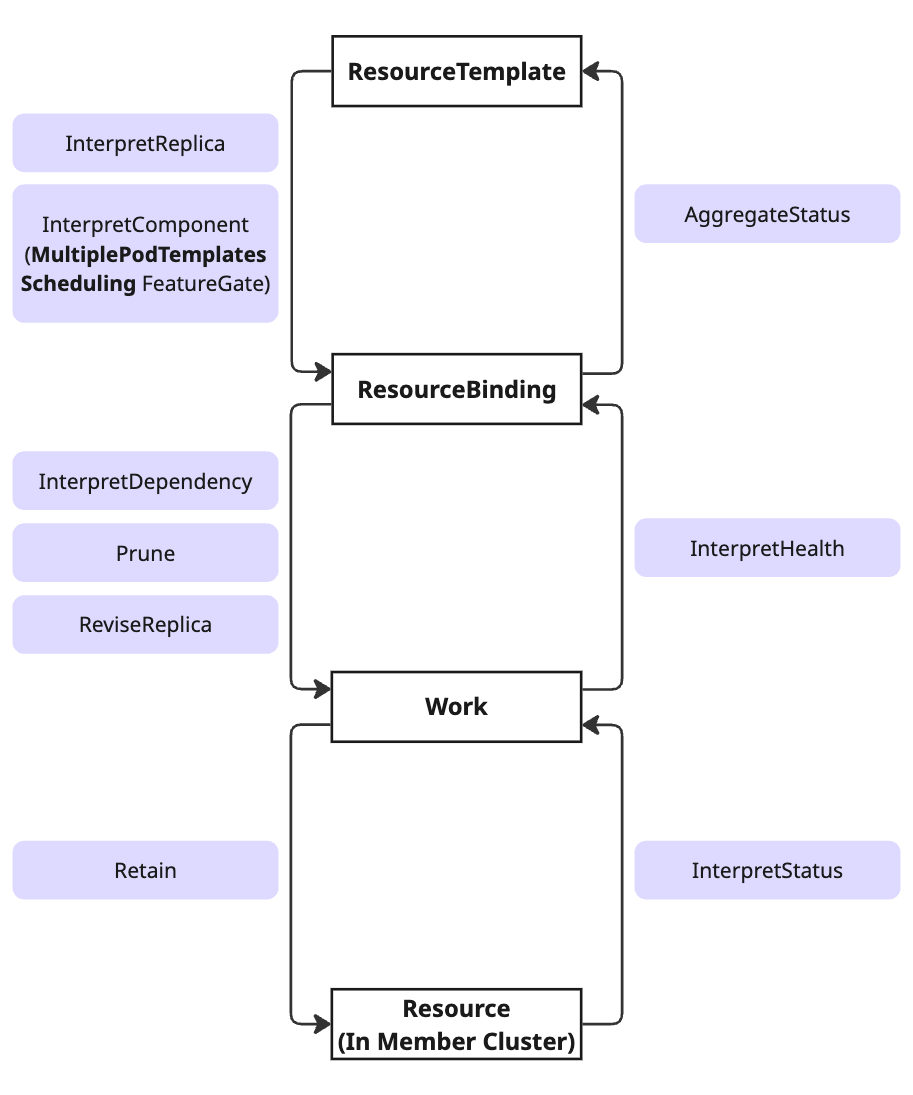
Lifecycle Stages:
-
ResourceTemplate ↔ ResourceBinding: Replica interpretation phase
InterpretReplica: For single-component workloadsInterpretComponent(v1.16+): For multi-component workloads with theMultiplePodTemplatesSchedulingfeature gateAggregateStatus: Collects status from member clusters back to control plane
-
ResourceBinding ↔ Work: Resource scheduling phase
InterpretDependency: Identifies dependent resourcesPrune: Removes obsolete resourcesReviseReplica: Adjusts replica counts for target clusters
-
Work ↔ Resource (Member Cluster): Deployment phase
Retain: Preserves member cluster modificationsInterpretStatus: Extracts status fields to reportInterpretHealth: Assesses resource health
Note: The new
InterpretComponentoperation (v1.16+, highlighted in the diagram) enables accurate scheduling for multi-component workloads by capturing per-component resource requirements, while maintaining backward compatibility withInterpretReplicathrough automatic fallback.
InterpretReplica
Purpose: Extract the desired replica count and resource requirements from single-component workload resources.
Use Cases:
- Enable resource-aware scheduling for workloads with a single pod template
- Extract replica count, CPU/memory requirements, node affinity, and tolerations
- Support accurate cluster capacity estimation
- Provide foundation for replica distribution across clusters
Applicable Resources:
- Kubernetes native: Deployment, StatefulSet, Job, Pod
- Custom resources: Any CRD with a single pod template (e.g., Argo Workflow, Kruise CloneSet)
- Multi-component workloads: Can be used with custom estimation logic (e.g., summing replicas, using max resources), though
InterpretComponentprovides more accurate scheduling
Return Values:
type ReplicaResult struct {
    Replicas            int32                 // Desired number of replicas
    ReplicaRequirements *ReplicaRequirements  // Per-replica resource requirements
}

type ReplicaRequirements struct {
    ResourceRequest   corev1.ResourceList    // CPU, memory, etc.
    NodeClaim         *NodeClaim             // Node selector, affinity, tolerations
    Namespace         string
    PriorityClassName string
}
Example: For a Deployment with 3 replicas requesting 1 CPU and 2Gi memory each:
InterpretReplica Result:
  replicas: 3
  replicaRequirements:
    resourceRequest:
      cpu: "1"
      memory: "2Gi"
InterpretComponent
Available Since: Karmada v1.16+ (NEW)
Feature Gate:MultiplePodTemplatesScheduling(Alpha, disabled by default)
Purpose: Extract resource specifications from multi-component workloads where each component has different replica counts and resource requirements.
Motivation:
Many modern distributed applications consist of multiple components with heterogeneous resource needs. Traditional InterpretReplica assumes all replicas are identical, leading to scheduling inaccuracies.
Real-World Examples:
| Workload Type | Components | Typical Configuration |
|---|---|---|
| FlinkDeployment | JobManager TaskManager | 1 replica, 1 CPU, 2Gi 3 replicas, 2 CPU, 4Gi |
| RayCluster | Head Worker | 1 replica, 2 CPU, 4Gi 5 replicas, 4 CPU, 8Gi |
| Spark Application | Driver Executor | 1 replica, 1 CPU, 2Gi 10 replicas, 2 CPU, 4Gi |
Note: See Accuracy Comparison below for a detailed comparison showing how
InterpretComponentprovides more accurate resource estimation thanInterpretReplicafor multi-component workloads.
Use Cases: Enable accurate scheduling and resource estimation for complex workloads:
- AI/ML workloads (TrainJob, RayCluster, RayJob)
- Big Data processing (FlinkDeployment, SparkApplication, Volcano Job)
- Distributed systems with heterogeneous components
Return Values:
// Array of ComponentRequirements
[]ComponentRequirements{
  {
    Name:                "component-name",      // Component identifier
    Replicas:            3,                     // Replica count for this component
    ReplicaRequirements: {...},                 // Resource requirements per replica
  },
}
API Structure:
// ComponentRequirements represents requirements for a single component
type ComponentRequirements struct {
    Name                string                // Component identifier (e.g., "jobmanager", "taskmanager")
    Replicas            int32                 // Desired replica count for this component
    ReplicaRequirements *ReplicaRequirements  // Per-replica resource requirements (same structure as InterpretReplica)
}
Enabling the Feature:
The InterpretComponent operation requires enabling the MultiplePodTemplatesScheduling feature gate:
# Edit karmada-controller-manager deployment
kubectl edit deployment karmada-controller-manager -n karmada-system
Add to container args:
spec:
  template:
    spec:
      containers:
      - name: karmada-controller-manager
        args:
        - --feature-gates=MultiplePodTemplatesScheduling=true
        # ... other args
Verify the feature gate:
# Check deployment configuration
kubectl get deployment karmada-controller-manager -n karmada-system -o yaml | grep feature-gates

# Check controller logs
kubectl logs -n karmada-system deployment/karmada-controller-manager | grep "Feature gates"
⚠️ Important: Controller restart is required after enabling the feature gate.
Execution Priority: InterpretComponent vs InterpretReplica
Understanding the execution order between InterpretComponent and InterpretReplica is crucial for implementing multi-component resource interpreters correctly.
Decision Flow
The Resource Interpreter Framework uses a three-step decision logic to determine which replica interpretation operation to execute. Understanding this flow is essential for implementing multi-component interpreters correctly.
Step 1: Feature Gate Check
The framework first checks if the MultiplePodTemplatesScheduling feature gate is enabled in the karmada-controller-manager:
- If YES (Feature gate enabled): Proceed to Step 2 to check for InterpretComponent implementation
- If NO (Feature gate disabled): Skip directly to Step 3 (fallback to InterpretReplica)
This ensures backward compatibility - existing deployments without the feature gate continue using InterpretReplica without any changes.
Step 2: Operation Implementation Check
If the feature gate is enabled, the framework checks whether the resource has an InterpretComponent interpreter implementation (via Declarative, Webhook, Thirdparty, or Built-in):
-
If YES (InterpretComponent implemented):
- Execute InterpretComponent operation
- Populate
spec.componentsarray in ResourceBinding - Return immediately - InterpretReplica is completely skipped
- This provides accurate per-component resource calculations
-
If NO (InterpretComponent not implemented):
- Proceed to Step 3 (fallback to InterpretReplica)
- Maintains compatibility with resources that only have InterpretReplica
Step 3: Fallback to InterpretReplica
This step is reached in two scenarios:
- Feature gate is disabled (from Step 1)
- Feature gate is enabled but InterpretComponent is not implemented (from Step 2)
Action:
- Execute
InterpretReplicaoperation - Populate
spec.replicasandspec.replicaRequirementsin ResourceBinding - Provides backward-compatible behavior for single-component workloads
Decision Summary Table:
| Step | Condition | Action | Result |
|---|---|---|---|
| 1 | Feature Gate Enabled? | Check gate status | If YES → Step 2 If NO → Step 3 |
| 2 | InterpretComponent Implemented? | Check for implementation | If YES → Execute & Return If NO → Step 3 |
| 3 | Fallback | Execute InterpretReplica | Populate single-component fields |
Key Characteristics
| Aspect | Behavior |
|---|---|
| Mutual Exclusivity | Only ONE operation executes per resource, never both simultaneously |
| Immediate Return | InterpretComponent returns immediately after success, completely skipping InterpretReplica |
| Automatic Fallback | If feature gate is OFF or InterpretComponent not implemented, automatically falls back to InterpretReplica |
| Backward Compatibility | Existing InterpretReplica implementations continue working unchanged |
| Zero Migration Cost | No code changes needed to existing interpreters when enabling the feature gate |
Accuracy Comparison
Example: FlinkDeployment (JobManager + TaskManager)
This example demonstrates the difference between InterpretComponent and InterpretReplica for a FlinkDeployment with heterogeneous components:
- JobManager: 1 replica, 1 CPU, 2Gi memory
- TaskManager: 3 replicas, 2 CPU, 4Gi memory
Approach 1: InterpretComponent (accurate per-component calculation)
# ResourceBinding populated by InterpretComponent
spec:
  components:
    - name: jobmanager
      replicas: 1
      replicaRequirements:
        resourceRequest:
          cpu: "1"
          memory: "2Gi"
    - name: taskmanager
      replicas: 3
      replicaRequirements:
        resourceRequest:
          cpu: "2"
          memory: "4Gi"
Total Resource Calculation:
- JobManager: 1 × (1 CPU + 2Gi) = 1 CPU, 2Gi
- TaskManager: 3 × (2 CPU + 4Gi) = 6 CPU, 12Gi
- Total: 7 CPU, 14Gi (Precise)
Approach 2: InterpretReplica (estimation with custom logic)
# ResourceBinding populated by InterpretReplica
spec:
  replicas: 4  # Custom logic: sum all replicas (1 + 3)
  replicaRequirements:
    resourceRequest:
      cpu: "2"      # Custom logic: use max CPU across components
      memory: "4Gi" # Custom logic: use max memory across components
Total Resource Calculation:
- All replicas treated uniformly: 4 × (2 CPU + 4Gi) = 8 CPU, 16Gi
- Total: 8 CPU, 16Gi (Overestimated by 14% - 1 CPU, 2Gi excess)
Key Takeaway: While
InterpretReplicacan work for multi-component workloads with custom estimation logic,InterpretComponentprovides precise per-component resource tracking, leading to better scheduling decisions and resource utilization.
ReviseReplica
Purpose: Modify the replica count in the resource specification.
Use Cases:
- Allow Karmada to adjust replicas based on target cluster capacity
- Enable dynamic scaling during workload distribution
- Support replica spreading strategies across multiple clusters
Applicable Resources: Workload resources with adjustable replica fields (Deployment, StatefulSet, Job, and custom workload CRDs).
Retain
Purpose: Preserve specific fields from the observed state in member clusters when updating resources from the control plane.
Use Cases:
- Resolve control conflicts when both Karmada and member cluster controllers modify the same fields
- Prevent reconciliation loops between control plane and member clusters
- Allow member cluster autonomy for specific resource fields (e.g., HPA-managed replicas)
Critical Scenario: See Important Notes - Using Retain to Resolve Control Conflicts for detailed usage.
Applicable Resources: Any resource where certain fields should be retained from the member cluster's observed state.
AggregateStatus
Purpose: Aggregate status information collected from multiple member clusters into the resource template's status in the control plane.
Use Cases:
- Provide a unified view of resource status across all member clusters
- Calculate aggregate metrics (total ready replicas, combined conditions, etc.)
- Enable centralized monitoring and observability
Applicable Resources: Resources that report status information (Deployment, StatefulSet, DaemonSet, Job, CronJob, Service, Ingress, Pod, and custom resources with status).
InterpretStatus
Purpose: Extract (reflect) specific status fields from a resource instance in a member cluster that should be collected for aggregation.
Use Cases:
- Determine which status fields to collect from member clusters
- Filter sensitive or unnecessary status information
- Customize status reflection logic per resource type
Applicable Resources: Resources with status subresources that need selective field extraction.
InterpretHealth
Purpose: Assess the health state of a resource based on its observed state in member clusters.
Use Cases:
- Enable health-based scheduling and failover decisions
- Monitor workload health across the federation
- Support custom health criteria for application-specific resources
Return Values: Boolean indicating whether the resource is healthy.
Applicable Resources: Resources with health indicators (conditions, ready replicas, phase, etc.).
InterpretDependency
Purpose: Identify dependent resources that should be propagated together with the main resource.
Use Cases:
- Ensure ConfigMaps, Secrets, ServiceAccounts are distributed with workloads
- Maintain resource dependency chains across clusters
- Prevent incomplete deployments due to missing dependencies
Return Values: Array of dependent resource references (namespace, name, kind, apiVersion).
Applicable Resources: Resources that reference other Kubernetes resources (Deployments, Jobs, Pods referencing ConfigMaps/Secrets, Ingress referencing Services, etc.).
Built-in Interpreter
For common Kubernetes native resources, the interpreter operations are built-in, which means users typically don't need to implement customized interpreters. These built-in interpreters are implemented and maintained by the Karmada community and are compiled into Karmada components such as karmada-controller-manager.
If you want additional resources to have built-in interpreter support, please file an issue to let us know your use case.
The built-in interpreter currently supports the following operations and resources:
InterpretReplica
Supported resources:
- Deployment (apps/v1)
- StatefulSet (apps/v1)
- Job (batch/v1)
- Pod (v1)
ReviseReplica
Supported resources:
- Deployment (apps/v1)
- StatefulSet (apps/v1)
- Job (batch/v1)
Retain
Supported resources:
- Pod (v1)
- Service (v1)
- ServiceAccount (v1)
- PersistentVolumeClaim (v1)
- PersistentVolume (v1)
- Job (batch/v1)
AggregateStatus
Supported resources:
- Deployment (apps/v1)
- Service (v1)
- Ingress (networking.k8s.io/v1)
- Job (batch/v1)
- CronJob (batch/v1)
- DaemonSet (apps/v1)
- StatefulSet (apps/v1)
- Pod (v1)
- PersistentVolume (v1)
- PersistentVolumeClaim (v1)
- PodDisruptionBudget (policy/v1)
InterpretStatus
Supported resources:
- Deployment (apps/v1)
- Service (v1)
- Ingress (networking.k8s.io/v1)
- Job (batch/v1)
- DaemonSet (apps/v1)
- StatefulSet (apps/v1)
- PodDisruptionBudget (policy/v1)
InterpretDependency
Supported resources:
- Deployment (apps/v1)
- Job (batch/v1)
- CronJob (batch/v1)
- Pod (v1)
- DaemonSet (apps/v1)
- StatefulSet (apps/v1)
- Ingress (networking.k8s.io/v1)
InterpretHealth
Supported resources:
- Deployment (apps/v1)
- StatefulSet (apps/v1)
- ReplicaSet (apps/v1)
- DaemonSet (apps/v1)
- Service (v1)
- Ingress (networking.k8s.io/v1)
- PersistentVolumeClaim (v1)
- PodDisruptionBudget (policy/v1)
- Pod (v1)
Customizing Interpreters
Users can extend the Resource Interpreter Framework in two ways:
- Declarative Configuration: Define Lua scripts in
ResourceInterpreterCustomizationCRs - Webhook: Implement HTTP callbacks via
ResourceInterpreterWebhookConfiguration
Priority: Declarative configuration has higher priority than webhook. If both are defined for the same resource and operation, the declarative configuration will be used.
Thirdparty Interpreter (Built-in Declarative Configurations)
Karmada bundles declarative configurations for popular third-party resources, maintained by the community. Users can leverage these without implementing custom interpreters.
The thirdparty interpreter currently supports the following operations and resources:
InterpretComponent
Available Since: Karmada v1.16+
Supported resources:
- FlinkDeployment (flink.apache.org/v1beta1)
- RayCluster (ray.io/v1)
- RayJob (ray.io/v1)
- SparkApplication (sparkoperator.k8s.io/v1beta2)
InterpretReplica
Supported resources:
- BroadcastJob (apps.kruise.io/v1alpha1)
- CloneSet (apps.kruise.io/v1alpha1)
- AdvancedStatefulSet (apps.kruise.io/v1beta1)
- Workflow (argoproj.io/v1alpha1)
ReviseReplica
Supported resources:
- BroadcastJob (apps.kruise.io/v1alpha1)
- CloneSet (apps.kruise.io/v1alpha1)
- AdvancedStatefulSet (apps.kruise.io/v1beta1)
- Workflow (argoproj.io/v1alpha1)
Retain
Supported resources:
- BroadcastJob (apps.kruise.io/v1alpha1)
- Workflow (argoproj.io/v1alpha1)
- HelmRelease (helm.toolkit.fluxcd.io/v2beta1)
- Kustomization (kustomize.toolkit.fluxcd.io/v1)
- GitRepository (source.toolkit.fluxcd.io/v1)
- Bucket (source.toolkit.fluxcd.io/v1beta2)
- HelmChart (source.toolkit.fluxcd.io/v1beta2)
- HelmRepository (source.toolkit.fluxcd.io/v1beta2)
- OCIRepository (source.toolkit.fluxcd.io/v1beta2)
AggregateStatus
Supported resources:
- AdvancedCronJob (apps.kruise.io/v1alpha1)
- AdvancedDaemonSet (apps.kruise.io/v1alpha1)
- BroadcastJob (apps.kruise.io/v1alpha1)
- CloneSet (apps.kruise.io/v1alpha1)
- AdvancedStatefulSet (apps.kruise.io/v1beta1)
- HelmRelease (helm.toolkit.fluxcd.io/v2beta1)
- Kustomization (kustomize.toolkit.fluxcd.io/v1)
- ClusterPolicy (kyverno.io/v1)
- Policy (kyverno.io/v1)
- GitRepository (source.toolkit.fluxcd.io/v1)
- Bucket (source.toolkit.fluxcd.io/v1beta2)
- HelmChart (source.toolkit.fluxcd.io/v1beta2)
- HelmRepository (source.toolkit.fluxcd.io/v1beta2)
- OCIRepository (source.toolkit.fluxcd.io/v1beta2)
InterpretStatus
Supported resources:
- AdvancedDaemonSet (apps.kruise.io/v1alpha1)
- BroadcastJob (apps.kruise.io/v1alpha1)
- CloneSet (apps.kruise.io/v1alpha1)
- AdvancedStatefulSet (apps.kruise.io/v1beta1)
- HelmRelease (helm.toolkit.fluxcd.io/v2beta1)
- Kustomization (kustomize.toolkit.fluxcd.io/v1)
- ClusterPolicy (kyverno.io/v1)
- Policy (kyverno.io/v1)
- GitRepository (source.toolkit.fluxcd.io/v1)
- Bucket (source.toolkit.fluxcd.io/v1beta2)
- HelmChart (source.toolkit.fluxcd.io/v1beta2)
- HelmRepository (source.toolkit.fluxcd.io/v1beta2)
- OCIRepository (source.toolkit.fluxcd.io/v1beta2)
InterpretDependency
Supported resources:
- AdvancedCronJob (apps.kruise.io/v1alpha1)
- AdvancedDaemonSet (apps.kruise.io/v1alpha1)
- BroadcastJob (apps.kruise.io/v1alpha1)
- CloneSet (apps.kruise.io/v1alpha1)
- AdvancedStatefulSet (apps.kruise.io/v1beta1)
- Workflow (argoproj.io/v1alpha1)
- HelmRelease (helm.toolkit.fluxcd.io/v2beta1)
- Kustomization (kustomize.toolkit.fluxcd.io/v1)
- GitRepository (source.toolkit.fluxcd.io/v1)
- Bucket (source.toolkit.fluxcd.io/v1beta2)
- HelmChart (source.toolkit.fluxcd.io/v1beta2)
- HelmRepository (source.toolkit.fluxcd.io/v1beta2)
- OCIRepository (source.toolkit.fluxcd.io/v1beta2)
InterpretHealth
Supported resources:
- AdvancedCronJob (apps.kruise.io/v1alpha1)
- AdvancedDaemonSet (apps.kruise.io/v1alpha1)
- BroadcastJob (apps.kruise.io/v1alpha1)
- CloneSet (apps.kruise.io/v1alpha1)
- AdvancedStatefulSet (apps.kruise.io/v1beta1)
- Workflow (argoproj.io/v1alpha1)
- HelmRelease (helm.toolkit.fluxcd.io/v2beta1)
- Kustomization (kustomize.toolkit.fluxcd.io/v1)
- ClusterPolicy (kyverno.io/v1)
- Policy (kyverno.io/v1)
- GitRepository (source.toolkit.fluxcd.io/v1)
- Bucket (source.toolkit.fluxcd.io/v1beta2)
- HelmChart (source.toolkit.fluxcd.io/v1beta2)
- HelmRepository (source.toolkit.fluxcd.io/v1beta2)
- OCIRepository (source.toolkit.fluxcd.io/v1beta2)
Declarative Configuration
Declarative configuration allows you to quickly customize resource interpreters using Lua scripts defined in ResourceInterpreterCustomization resources.
Lua VM Built-in Functions
Karmada provides utility functions in the Lua VM to simplify interpreter implementation. These functions are available through the kube library.
accuratePodRequirements
Calculate accurate resource requirements from a PodTemplateSpec:
local kube = require("kube")

-- Function signature
replicaRequirements = kube.accuratePodRequirements(podTemplate)

-- Parameters:
--   podTemplate: PodTemplateSpec object
-- Returns:
--   replicaRequirements: ReplicaRequirements structure with resource requests,
--                        nodeSelector, tolerations, and affinity
Use Case: Implement replicaResource and componentResource operations.
getPodDependencies
Extract dependent resources from a PodTemplateSpec:
local kube = require("kube")

-- Function signature
dependencies = kube.getPodDependencies(podTemplate, namespace)

-- Parameters:
--   podTemplate: PodTemplateSpec object
--   namespace: Resource namespace
-- Returns:
--   dependencies: Array of dependent resources (ConfigMap, Secret,
--                 ServiceAccount, PersistentVolumeClaim)
Use Case: Implement dependencyInterpretation operation.
See kubeLibrary for complete documentation of available functions.
Writing ResourceInterpreterCustomization
Below is a comprehensive example demonstrating all available customization operations:
Complete ResourceInterpreterCustomization Example
apiVersion: config.karmada.io/v1alpha1
kind: ResourceInterpreterCustomization
metadata:
  name: declarative-configuration-example
spec:
  target:
    apiVersion: apps/v1
    kind: Deployment
  customizations:
    replicaResource:
      luaScript: >
        local kube = require("kube")
        function GetReplicas(obj)
          replica = obj.spec.replicas
          requirement = kube.accuratePodRequirements(obj.spec.template)
          return replica, requirement
        end
    replicaRevision:
      luaScript: >
        function ReviseReplica(obj, desiredReplica)
          obj.spec.replicas = desiredReplica
          return obj
        end
    retention:
      luaScript: >
        function Retain(desiredObj, observedObj)
          desiredObj.spec.paused = observedObj.spec.paused
          return desiredObj
        end
    statusAggregation:
      luaScript: >
        function AggregateStatus(desiredObj, statusItems)
          if statusItems == nil then
            return desiredObj
          end
          if desiredObj.status == nil then
            desiredObj.status = {}
          end
          replicas = 0
          for i = 1, #statusItems do
            if statusItems[i].status ~= nil and statusItems[i].status.replicas ~= nil then
              replicas = replicas + statusItems[i].status.replicas
            end
          end
          desiredObj.status.replicas = replicas
          return desiredObj
        end
    statusReflection:
      luaScript: >
        function ReflectStatus (observedObj)
          return observedObj.status
        end
    healthInterpretation:
      luaScript: >
        function InterpretHealth(observedObj)
          return observedObj.status.readyReplicas == observedObj.spec.replicas
        end
    dependencyInterpretation:
      luaScript: >
        function GetDependencies(desiredObj)
          dependentSas = {}
          refs = {}
          if desiredObj.spec.template.spec.serviceAccountName ~= nil and desiredObj.spec.template.spec.serviceAccountName ~= 'default' then
            dependentSas[desiredObj.spec.template.spec.serviceAccountName] = true
          end
          local idx = 1
          for key, value in pairs(dependentSas) do
            dependObj = {}
            dependObj.apiVersion = 'v1'
            dependObj.kind = 'ServiceAccount'
            dependObj.name = key
            dependObj.namespace = desiredObj.metadata.namespace
            refs[idx] = dependObj
            idx = idx + 1
          end
          return refs
        end
ReplicaResource
ReplicaResource describes the rules for extracting a resource's replica count and resource requirements. Useful for CRD resources that declare workload types similar to Deployment.
Lua Function Signature:
function GetReplicas(obj)
  -- Returns: replicas (int), replicaRequirements (table)
end
Example: See the Complete ResourceInterpreterCustomization Example above showing replicaResource implementation for Deployment.
ComponentResource
Available Since: Karmada v1.16+
ComponentResource describes the rules for extracting multiple components from a resource, where each component has its own replica count and resource requirements.
When to Use:
- Resource has multiple pod templates with different resource requirements
- Examples: FlinkDeployment (JobManager + TaskManager), RayCluster (Head + Worker), Spark (Driver + Executor)
Lua Function Signature:
function GetComponents(obj)
  -- Returns: array of component tables
  -- Each component must have: name, replicas, replicaRequirements
  return {
    {name="component-1", replicas=1, replicaRequirements={...}},
    {name="component-2", replicas=3, replicaRequirements={...}},
  }
end
Example 1: Hypothetical Multi-Component Workload
This example illustrates how to implement componentResource for a CRD with multiple component specifications:
apiVersion: config.karmada.io/v1alpha1
kind: ResourceInterpreterCustomization
metadata:
  name: workload-multi-component
spec:
  target:
    apiVersion: workload.example.io/v1alpha1
    kind: Workload
  customizations:
    componentResource:
      luaScript: >
        local kube = require("kube")
        function GetComponents(obj)
          components = {}

          -- Iterate through all components in the workload spec
          if obj.spec.components ~= nil then
            for i, component in ipairs(obj.spec.components) do
              c = {}
              c.name = component.name
              c.replicas = component.replicas or 1

              -- Use kube library to calculate accurate requirements
              if component.template ~= nil then
                c.replicaRequirements = kube.accuratePodRequirements(component.template)
              end

              table.insert(components, c)
            end
          end

          return components
        end
Hypothetical Workload Resource:
apiVersion: workload.example.io/v1alpha1
kind: Workload
metadata:
  name: multi-component-workload
spec:
  components:
    - name: frontend
      replicas: 3
      template:
        spec:
          containers:
          - name: nginx
            image: nginx:latest
            resources:
              requests:
                cpu: "500m"
                memory: "512Mi"
    - name: backend
      replicas: 2
      template:
        spec:
          containers:
          - name: app
            image: backend:v1
            resources:
              requests:
                cpu: "1"
                memory: "1Gi"
Note: The Workload CRD in
examples/customresourceinterpretercurrently implements a single-component structure (similar to Deployment) for demonstration purposes. The webhook implementation atworkloadwebhook.goreturns a single component named "main". The multi-component example above is illustrative to show the pattern for CRDs with multiple pod templates.
Example 2: FlinkDeployment
FlinkDeployment has a complete implementation in Karmada's thirdparty interpreter:
Location: FlinkDeployment customization file
Key Features:
- Extracts JobManager and TaskManager components separately
- Calculates TaskManager replicas automatically from
parallelismandtaskmanager.numberOfTaskSlotsif not explicitly set - Handles resource requirements (CPU, memory) for each component
- Applies pod template specifications (nodeSelector, tolerations, priority)
Simplified Example Pattern:
apiVersion: config.karmada.io/v1alpha1
kind: ResourceInterpreterCustomization
metadata:
  name: flink-deployment-interpreter
spec:
  target:
    apiVersion: flink.apache.org/v1beta1
    kind: FlinkDeployment
  customizations:
    componentResource:
      luaScript: >
        local kube = require("kube")
        function GetComponents(obj)
          components = {}

          -- JobManager component
          if obj.spec.jobManager ~= nil then
            jm = {}
            jm.name = "jobmanager"
            jm.replicas = obj.spec.jobManager.replicas or 1
            jm.replicaRequirements = kube.accuratePodRequirements(obj.spec.jobManager.podTemplate)
            table.insert(components, jm)
          end

          -- TaskManager component
          if obj.spec.taskManager ~= nil then
            tm = {}
            tm.name = "taskmanager"
            tm.replicas = obj.spec.taskManager.replicas
            tm.replicaRequirements = kube.accuratePodRequirements(obj.spec.taskManager.podTemplate)
            table.insert(components, tm)
          end

          return components
        end
Note: The actual implementation includes advanced features like automatic TaskManager replica calculation. For the complete implementation, see the thirdparty customization file.
Note:
componentResourceandreplicaResourceare mutually exclusive. Implement only one per resource type based on whether the resource has single or multiple pod templates.
ReplicaRevision
ReplicaRevision describes the rules for revising a resource's replica count. Useful for CRD resources that declare adjustable replica fields.
Lua Function Signature:
function ReviseReplica(obj, desiredReplica)
  -- Modify obj.spec.replicas and return the modified object
  return obj
end
Example: See the Complete ResourceInterpreterCustomization Example above showing replicaRevision implementation for Deployment.
Retention
Retention describes how Karmada should react to changes made by member cluster components. This prevents reconciliation loops when both the control plane and member clusters modify the same fields.
Lua Function Signature:
function Retain(desiredObj, observedObj)
  -- Preserve specific fields from observedObj in desiredObj
  return desiredObj
end
Example: See the Complete ResourceInterpreterCustomization Example above showing retention implementation for Deployment, and Important Notes for handling HPA conflicts.
StatusAggregation
StatusAggregation describes the rules for aggregating status collected from member clusters to the resource template.
Lua Function Signature:
function AggregateStatus(desiredObj, statusItems)
  -- statusItems is an array of {clusterName="...", status={...}}
  -- Aggregate into desiredObj.status
  return desiredObj
end
Example - Kyverno ClusterPolicy:
StatusAggregation for ClusterPolicy
statusAggregation:
  luaScript: >
    function AggregateStatus(desiredObj, statusItems)
      if statusItems == nil then
        return desiredObj
      end
      desiredObj.status = {}
      desiredObj.status.conditions = {}
      rulecount = {}
      rulecount.validate = 0
      rulecount.generate = 0
      rulecount.mutate = 0
      rulecount.verifyimages = 0
      conditions = {}
      local conditionsIndex = 1
      for i = 1, #statusItems do
        if statusItems[i].status ~= nil and statusItems[i].status.autogen ~= nil then
          desiredObj.status.autogen = statusItems[i].status.autogen
        end
        if statusItems[i].status ~= nil and statusItems[i].status.ready ~= nil then
          desiredObj.status.ready = statusItems[i].status.ready
        end
        if statusItems[i].status ~= nil and statusItems[i].status.rulecount ~= nil then
          rulecount.validate = rulecount.validate + statusItems[i].status.rulecount.validate
          rulecount.generate = rulecount.generate + statusItems[i].status.rulecount.generate
          rulecount.mutate = rulecount.mutate + statusItems[i].status.rulecount.mutate
          rulecount.verifyimages = rulecount.verifyimages + statusItems[i].status.rulecount.verifyimages
        end
        if statusItems[i].status ~= nil and statusItems[i].status.conditions ~= nil then
          for conditionIndex = 1, #statusItems[i].status.conditions do
            statusItems[i].status.conditions[conditionIndex].message = statusItems[i].clusterName..'='..statusItems[i].status.conditions[conditionIndex].message
            hasCondition = false
            for index = 1, #conditions do
              if conditions[index].type == statusItems[i].status.conditions[conditionIndex].type and conditions[index].status == statusItems[i].status.conditions[conditionIndex].status and conditions[index].reason == statusItems[i].status.conditions[conditionIndex].reason then
                conditions[index].message = conditions[index].message..', '..statusItems[i].status.conditions[conditionIndex].message
                hasCondition = true
                break
              end
            end
            if not hasCondition then
              conditions[conditionsIndex] = statusItems[i].status.conditions[conditionIndex]
              conditionsIndex = conditionsIndex + 1
            end
          end
        end
      end
      desiredObj.status.rulecount = rulecount
      desiredObj.status.conditions = conditions
      return desiredObj
    end
StatusReflection
StatusReflection describes the rules for extracting status fields from a resource instance in member clusters.
Lua Function Signature:
function ReflectStatus(observedObj)
  -- Return a table containing the status fields to collect
  return {field1=value1, field2=value2}
end
Example - Kyverno ClusterPolicy:
StatusReflection for ClusterPolicy
statusReflection:
  luaScript: >
    function ReflectStatus (observedObj)
      status = {}
      if observedObj == nil or observedObj.status == nil then
        return status
      end
      status.ready = observedObj.status.ready
      status.conditions = observedObj.status.conditions
      status.autogen = observedObj.status.autogen
      status.rulecount = observedObj.status.rulecount
      return status
    end
HealthInterpretation
HealthInterpretation describes the health assessment rules for determining if a resource is healthy.
Lua Function Signature:
function InterpretHealth(observedObj)
  -- Return true if healthy, false otherwise
  return boolean
end
Example - Kyverno ClusterPolicy:
HealthInterpretation for ClusterPolicy
healthInterpretation:
  luaScript: >
    function InterpretHealth(observedObj)
      if observedObj.status ~= nil and observedObj.status.ready ~= nil then
        return observedObj.status.ready
      end
      if observedObj.status ~= nil and observedObj.status.conditions ~= nil then
        for conditionIndex = 1, #observedObj.status.conditions do
          if observedObj.status.conditions[conditionIndex].type == 'Ready' and observedObj.status.conditions[conditionIndex].status == 'True' and observedObj.status.conditions[conditionIndex].reason == 'Succeeded' then
            return true
          end
        end
      end
      return false
    end
DependencyInterpretation
DependencyInterpretation describes the rules for analyzing dependent resources.
Lua Function Signature:
function GetDependencies(desiredObj)
  -- Return array of dependency tables with apiVersion, kind, namespace, name
  return {{apiVersion="v1", kind="Secret", namespace="...", name="..."}}
end
Example: See the Complete ResourceInterpreterCustomization Example above showing dependencyInterpretation implementation for identifying ServiceAccount dependencies in Deployment.
Verification
Use the karmadactl interpret command to verify your ResourceInterpreterCustomization before applying to the cluster:
# Verify InterpretComponent operation
karmadactl interpret -f workload.yaml \
  --operation=InterpretComponent \
  --customization=interpreter-customization.yaml

# Verify other operations
karmadactl interpret -f resource.yaml \
  --operation=InterpretReplica \
  --customization=interpreter-customization.yaml
For more examples, see karmadactl interpret documentation.
Webhook
Interpreter webhooks are HTTP callbacks that receive interpretation requests from Karmada components and return interpretation results.
Request and Response Structures
The webhook receives ResourceInterpreterRequest and returns ResourceInterpreterResponse. The request contains the resource object and operation type, while the response includes operation-specific fields.
For detailed API structures and field descriptions, refer to:
Complete Implementation Reference
For a complete, production-ready webhook implementation demonstrating all interpreter operations (including InterpretComponent), refer to the Karmada repository:
-
Webhook Handler:
examples/customresourceinterpreter/webhook/app/workloadwebhook.go- Handles all 8 interpreter operations
- Shows request/response handling patterns
- Includes error handling and validation
-
Workload CRD Definition:
examples/customresourceinterpreter/apis/workload/v1alpha1/workload_types.go- Custom resource structure
- Spec and status definitions
-
Complete Setup Guide:
examples/customresourceinterpreter/README.md- Installation prerequisites
- Deployment instructions
- Configuration examples
- Troubleshooting guide
Deployment
The webhook server needs to be deployed and exposed as a Service accessible by Karmada components.
Key Requirements:
- TLS certificate for secure communication
- Proper Service exposure (LoadBalancer for Pull clusters, ClusterIP for Push-only)
- Correct namespace and network configuration
For complete deployment instructions including:
- Prerequisites and MetalLB setup
- Certificate generation
- Deployment manifests
- Troubleshooting tips
Please refer to: Karmada Resource Interpreter Webhook Example - Installation Guide
Example Implementation: The
examples/customresourceinterpreterdirectory contains a complete working webhook implementation with deployment configurations.
Configuration
Configure the webhook via ResourceInterpreterWebhookConfiguration:
apiVersion: config.karmada.io/v1alpha1
kind: ResourceInterpreterWebhookConfiguration
metadata:
  name: workload-interpreter
webhooks:
  - name: workloads.example.io
    rules:
      - operations: ["InterpretComponent", "InterpretReplica", "ReviseReplica", "Retain", "AggregateStatus"]
        apiGroups: ["workload.example.io"]
        apiVersions: ["v1alpha1"]
        kinds: ["Workload"]
    clientConfig:
      url: https://karmada-interpreter-webhook-example.karmada-system.svc:443/interpreter-workload
      caBundle: {{base64-encoded-ca-cert}}
    interpreterContextVersions: ["v1alpha1"]
    timeoutSeconds: 15
Configuration Options:
- Service reference: Use
service.namespace/namefor in-cluster webhooks - URL: Use
urlfor external webhooks or specific endpoints - caBundle: Base64-encoded CA certificate for TLS verification
- timeoutSeconds: Maximum response wait time (default: 15)
Advanced Configuration Topics:
- Multi-cluster access patterns (Push vs Pull clusters)
- Service types (ClusterIP, LoadBalancer, ExternalName)
- Certificate management and CN field setup
- Cross-namespace deployment considerations
For detailed configuration examples and troubleshooting: Webhook Configuration Guide
Priority Reminder:
- Declarative Configuration > Webhook > Thirdparty > Built-in
- If a Declarative Configuration exists for the same resource and operation, it takes precedence over the webhook
Complete Examples
The Karmada repository provides two complete example directories demonstrating different interpreter implementation approaches:
Webhook Implementation: examples/customresourceinterpreter
Webhook implementation demonstrating all interpreter operations for a custom Workload CRD.
Repository: karmada-io/karmada/examples/customresourceinterpreter
Key Files:
- Workload CRD:
apis/workload.example.io_workloads.yaml- Single-component workload (similar to Deployment) - Webhook Server (Go):
webhook/app/workloadwebhook.go- Implements all 8 interpreter operations - Deployment:
karmada-interpreter-webhook-example.yaml - Configuration:
webhook-configuration.yaml - Setup Guide:
README.md- Prerequisites, MetalLB setup, certificates, troubleshooting
Quick Start:
kubectl apply -f examples/customresourceinterpreter/apis/workload.example.io_workloads.yaml
kubectl apply -f examples/customresourceinterpreter/karmada-interpreter-webhook-example.yaml
kubectl apply -f examples/customresourceinterpreter/webhook-configuration.yaml
kubectl apply -f examples/customresourceinterpreter/workload-sample.yaml
kubectl apply -f examples/customresourceinterpreter/workload-propagationpolicy.yaml
Declarative Configuration: examples/karmadactlinterpret
Lua script examples for standard Kubernetes Deployment using ResourceInterpreterCustomization.
Repository: karmada-io/karmada/examples/karmadactlinterpret
Key Files:
- ResourceInterpreterCustomization:
resourceinterpretercustomization.yaml- Lua scripts for all operations - Sample Deployments:
desired-deploy-nginx.yaml,observed-deploy-nginx.yaml - Testing Guide:
README.md- karmadactl interpret command examples
Quick Test:
# Validate Lua scripts
karmadactl interpret -f examples/karmadactlinterpret/resourceinterpretercustomization.yaml --check

# Test InterpretReplica operation
karmadactl interpret -f examples/karmadactlinterpret/resourceinterpretercustomization.yaml \
  --observed-file examples/karmadactlinterpret/observed-deploy-nginx.yaml \
  --operation InterpretReplica
Implementation Choice
| Approach | Best For | Pros | Cons |
|---|---|---|---|
Webhookcustomresourceinterpreter | Complex CRDs with multiple components | Full Go control Production-ready Advanced logic | Server deployment Maintenance overhead TLS certificates |
Declarativekarmadactlinterpret | Standard workloads | Lightweight Rapid prototyping No server needed Test with karmadactl | Limited to Lua Less flexibility |
Important Notes
Use the Retain Interpreter to Resolve Control Conflict between the Control Plane and Member Clusters
Problem: Control conflicts occur when both the Karmada control plane and member cluster controllers (e.g., HPA, VPA, cluster autoscalers) attempt to modify the same resource fields. This leads to continuous reconciliation loops and unstable resource states.
Common Scenario:
A Deployment's replica count is managed by both:
- Karmada control plane: Propagates replicas from the resource template
- Member cluster HPA: Adjusts replicas based on CPU/memory metrics
This creates an infinite loop:
HPA scales → replicas: 5
    ↓
Karmada detects drift → reverts to template → replicas: 3
    ↓
HPA scales again → replicas: 5
    ↓
Loop continues ♾️
Result: Deployment continuously oscillates, pods are repeatedly created and deleted, service disruption occurs.
Solution: Implement Retain Interpreter
The Retain operation allows you to specify which fields should be preserved from the member cluster's observed state during resource updates, breaking the reconciliation loop.
Built-in Support for Deployment:
Karmada provides a built-in Retain interpreter for Deployment resources:
- Label-based control: If the resource template has the label
resourcetemplate.karmada.io/retain-replicas, the replicas field is retained from the member cluster (controlled by HPA) - Without label: Replicas are controlled by the Karmada control plane
- Automatic labeling: When the
deploymentReplicasSyncercontroller is enabled, Karmada automatically adds this label to Deployments that have an associated HPA
Custom Implementation for CRDs:
For custom resources, implement the Retain interpreter as follows:
apiVersion: config.karmada.io/v1alpha1
kind: ResourceInterpreterCustomization
metadata:
  name: custom-workload-retain
spec:
  target:
    apiVersion: example.io/v1
    kind: CustomWorkload
  customizations:
    retention:
      luaScript: >
        function Retain(desiredObj, observedObj)
          -- Retain replicas if controlled by HPA
          if desiredObj.metadata.labels ~= nil and
             desiredObj.metadata.labels["resourcetemplate.karmada.io/retain-replicas"] == "true" then
            desiredObj.spec.replicas = observedObj.spec.replicas
          end

          -- Retain pause status (modified by member cluster operations)
          if observedObj.spec.paused ~= nil then
            desiredObj.spec.paused = observedObj.spec.paused
          end

          -- Retain other fields modified by member cluster controllers
          -- Add more field retention logic as needed

          return desiredObj
        end
Usage Example:
# Resource template with retain label
apiVersion: apps/v1
kind: Deployment
metadata:
  name: web-app
  labels:
    resourcetemplate.karmada.io/retain-replicas: "true"  # Enable replica retention
spec:
  replicas: 3  # Initial value, will be managed by HPA afterward
  # ... rest of spec
---
# Member cluster HPA
apiVersion: autoscaling/v2
kind: HorizontalPodAutoscaler
metadata:
  name: web-app-hpa
spec:
  scaleTargetRef:
    apiVersion: apps/v1
    kind: Deployment
    name: web-app
  minReplicas: 2
  maxReplicas: 10
  metrics:
  - type: Resource
    resource:
      name: cpu
      target:
        type: Utilization
        averageUtilization: 70
Behavior:
- Initial deployment: Karmada creates Deployment with 3 replicas
- HPA scales to 7 replicas based on load
- Karmada reconciliation: Sees the
retain-replicaslabel, preserves 7 replicas (does not revert to 3) - Control loop resolved
Alternative Solution: FederatedHPA
For a more integrated approach, use Karmada's FederatedHPA:
Advantages:
- Centralized autoscaling policy in the control plane
- No control conflicts by design
- Cross-cluster scaling coordination
- Consistent behavior across all clusters
- No need for Retain interpreters
Reference:
- Built-in Deployment Retain implementation:
pkg/resourceinterpreter/default/native/deployment.go - Deployment Replicas Syncer controller:
pkg/controllers/deploymentreplicassyncer - Retention API: ResourceInterpreterCustomization retention field
Feature Gate Configuration for InterpretComponent
The InterpretComponent operation requires enabling the MultiplePodTemplatesScheduling feature gate.
Feature Status
| Attribute | Value |
|---|---|
| Operation | InterpretComponent |
| Feature Gate | MultiplePodTemplatesScheduling |
| Stage | Alpha ⚠️ |
| Available Since | Karmada v1.16+ |
| Default State | Disabled |
| Stability | May change in future versions |
⚠️ Alpha Feature Warning: This feature is under active development. APIs and behavior may change without notice. Not recommended for production use without thorough testing.
Enabling the Feature
Step 1: Edit Controller Manager Deployment
Edit the karmada-controller-manager deployment:
kubectl edit deployment karmada-controller-manager -n karmada-system
Add the feature gate to container args:
spec:
  template:
    spec:
      containers:
      - name: karmada-controller-manager
        args:
        - --feature-gates=MultiplePodTemplatesScheduling=true
        # ... other existing args
Save and exit. The controller will automatically restart.